
Emergencies are unpredictable and often strike when you least expect them. Whether you’re lost during a hike, stranded with a flat tire on a deserted road, or facing a more urgent crisis, being able to quickly share your exact location can be a lifesaver. Thankfully, modern smartphones make this easier than ever. Here’s a practical guide to help you share your location in critical moments, along with some tips to stay prepared.
He thought he was rescuing a sheep—but it turned out to be something else
This bizarre French customer habit is driving shop owners crazy
Sending Your Location Through Text Messages
Your smartphone is equipped with tools that allow you to share your location through simple text messages. Both Android and iPhone devices have features to send your current position with just a few taps. Here’s how it works for each platform.
For Android Users

If you’re using an Android smartphone, the process is straightforward and accessible via the Google Messages app:
- Open Google Messages: If it’s not already installed, you can download it for free from the Google Play Store.
- Start a Conversation: Open an existing chat or begin a new one with your contact.
- Tap the “+” Icon: You’ll find this at the bottom-left of your screen.
- Select “Location”: This will display a map with a pin showing your current position.
- Verify Your Location: Ensure the map is accurate before proceeding.
- Send Your Location: Tap the send button to share a clickable link to your location via Google Maps.
The recipient can open this link on any device, making it universally accessible, whether they use Android, iOS, or a desktop browser.
For iPhone Users
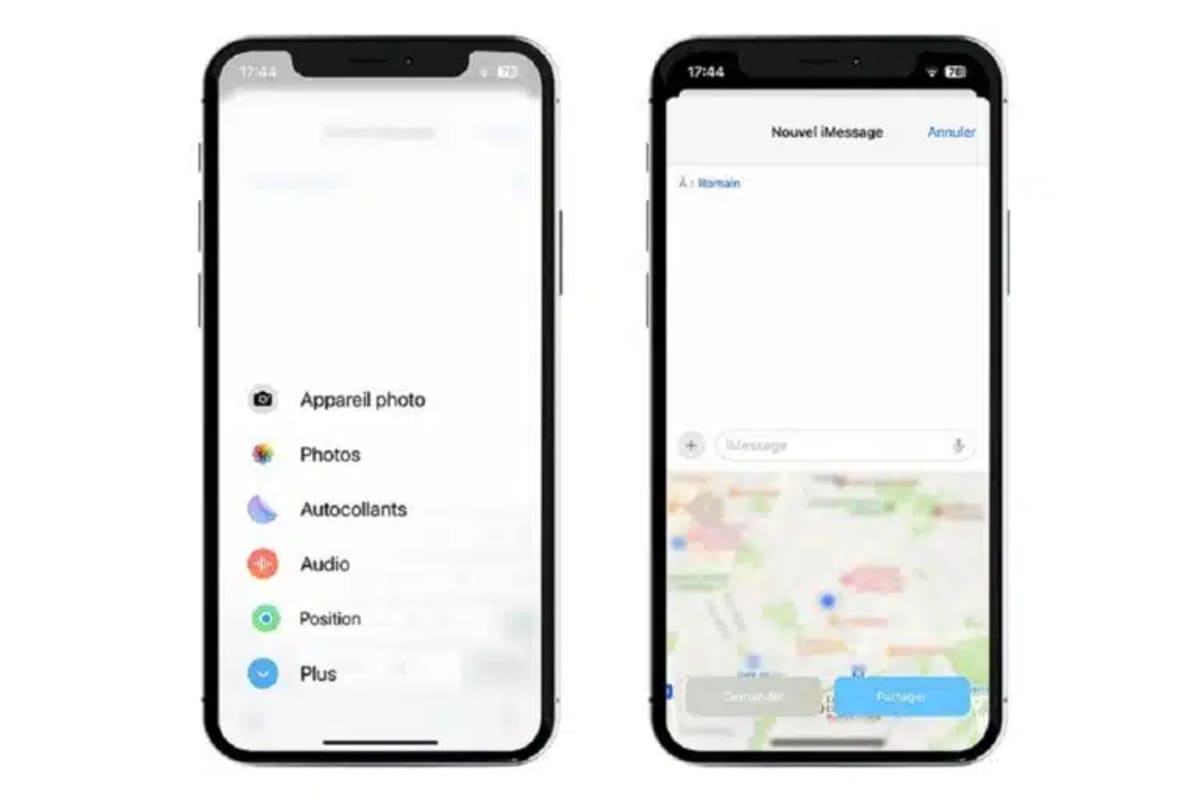
iPhones offer an equally simple way to share your location through the Messages app:
- Open Messages: Use the built-in texting app on your iPhone.
- Select a Conversation: Choose an existing chat or create a new one.
- Tap the “A” Icon: Located beside the text input field.
- Select “Maps”: From the app options that appear.
- Tap “Send My Current Location”: Your location will be sent as an Apple Maps link.
- Confirm and Send: Double-check the pin for accuracy before sending.
Even if the person you’re contacting uses a non-Apple device, they can still view your location in a browser or compatible mapping app.
Using Messaging Apps to Share Your Location
For those who prefer platforms like WhatsApp or Facebook Messenger, these apps also allow you to send your location. This can be especially useful if you’re already communicating through them.
Sharing Location on WhatsApp
- Open a Chat: Navigate to the conversation where you want to share your location.
- Tap the Attach Icon: It resembles a paperclip on Android or a “+” on iPhone.
- Choose “Location”: You’ll see options for “Live Location” or “Current Location.”
- Pick Your Option:
- Live Location: Shares your real-time movements for a specific duration (15 minutes, 1 hour, or 8 hours).
- Current Location: Sends a snapshot of your exact spot at the moment.
- Send: Hit the send button to share the location link.
Sharing Location on Facebook Messenger
- Open a Conversation: Choose the contact you want to share with.
- Tap the Four Dots Icon: This is near the text box area.
- Select “Location”: A map will appear, displaying your position.
- Share Live Location: Send your real-time movements for up to 60 minutes.
- Send: Your location link will be shared instantly.
Why Location Sharing Is Essential in Emergencies
Being able to share your location can make all the difference. I once helped a friend who got lost during a road trip. Thanks to the “Live Location” feature on WhatsApp, we tracked her movements and reached her before sunset. In critical situations, such as accidents or natural disasters, this feature can save valuable time for emergency responders. The Federal Communications Commission (FCC) highlights that accurate location data can significantly reduce response times during emergencies.
Tips for Effective Location Sharing
Preparation is key to making location sharing seamless when it matters most. Here are some tips to keep in mind:
- Enable Location Services: Always ensure your phone’s GPS is turned on. You can find this in your settings under “Location” or “Privacy.”
- Keep Your Phone Charged: A dead battery won’t help in an emergency. Carry a portable charger if you plan to be in remote areas.
- Practice in Advance: Familiarize yourself with the steps to share your location so you can act quickly under pressure.
- Notify Trusted Contacts: Let close friends or family know they might receive a location link from you in case of an emergency.
Final Thoughts
Emergencies are already stressful enough without the added frustration of trying to explain your location. By mastering these location-sharing features on your smartphone, you’ll be better prepared to handle any crisis. Whether you’re out exploring or navigating daily life, having this skill could make all the difference when seconds count.
Similar Posts
- How to send your location by text in case of an emergency ?
- How to Send Your Location via Text in an Emergency
- How to send your location via text in an emergency – a step-by-step guide ?
- Protect Your Phone from Prying Eyes with This Must-Have Setting!
- Beware! This Hyper-Realistic Personalized Text is a Crafty Scam

Felix Marlowe manages Belles and Gals’ vibrant social media platforms. With expertise in social engagement and viral marketing, Felix creates content that sparks conversation and keeps followers coming back for more. From celebrity news to trending challenges, Felix makes sure our social media stays at the forefront of pop culture.


